A timecard calculator tracks your daily clock-in and clock-out times, deducts breaks, flags overtime hours, and gives you a complete weekly timesheet ready for payroll. No spreadsheet required.
Timecard Calculator
Enter clock-in and clock-out times for each day to get total hours worked, overtime, and gross pay. Free, no sign-up.
- Handles overnight shifts
- HH:MM and decimal hours
- CSV and Excel export
Timesheet
Pay and overtime settings
Payroll errors rarely start at payday. They start on Monday morning, when someone logs the wrong clock-in time, forgets a break, or adds up hours by hand in a format that ignores base-60 math. This free tool works as both a timecard and a timesheet calculator, and the totals update as you type.
Enter your clock-in and clock-out times for each day, add your break duration, and the calculator handles the rest: daily totals, weekly totals, decimal conversion, and overtime flagging. Just need to check one shift? The Work Hours Calculator gives you a single day’s total in seconds. Need a figure converted for payroll software? The Hours & Minutes to Decimal Calculator does it in one step.
How to Use the Timecard Calculator
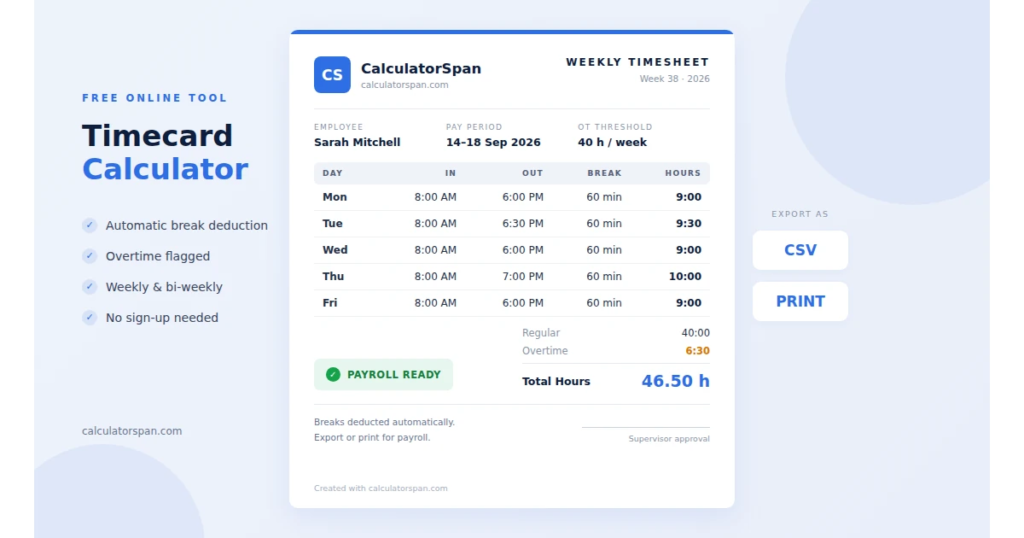
Setup takes about two minutes. After that, daily entries take seconds.
- Set your pay period. Choose your workweek start day, pay period (weekly or bi-weekly), and overtime threshold. Getting this right first means every total reflects your real schedule.
- Enter clock-in and clock-out times. Type your start and end time for each day. The calculator converts them to hours and adds them to your running total.
- Add unpaid breaks. Enter break time in minutes for each day. The calculator subtracts it from your gross hours, so your net worked time is always accurate. For planning breaks within a shift, use the Break Time Calculator.
- Export or print. When the pay period closes, download your timesheet as a CSV file or print it with Ctrl/Cmd + P.
How Clock-In and Clock-Out Times Are Calculated
The calculator uses base-60 time math, not decimal guesses. Enter 9:00 AM as clock-in and 5:30 PM as clock-out, and you get 8 hours 30 minutes, or 8.5 hours in decimal. A common manual mistake is treating the 30 minutes as .30 and recording 8.3 hours. That error looks small, but multiplied by an hourly rate every week, it becomes a real wage error.
Breaks work the same way. A 45-minute unpaid lunch taken from 8 hours 30 minutes of gross time leaves 7 hours 45 minutes of net worked time, which is 7.75 hours in decimal. The calculator does both steps at once for every day of the pay period.
For overnight shifts, rounding rules, and common shift lengths worked out in advance, see the Work Hours Calculator. Have a decimal total and need it back in hours and minutes? Use the Decimal to Time Calculator. To add or subtract individual durations, the Time Calculator handles hours, minutes, and seconds.
Weekly and Bi-Weekly Timesheets
A timesheet calculator and a timecard calculator do the same job. Both track hours worked across a pay period and return accurate totals. Most workplaces use the terms interchangeably.
For a weekly timesheet, entries reset after 7 days. For a bi-weekly timesheet, fill in daily entries across two full weeks, and the running total updates across the entire 14-day period. You do not need to recalculate anything when switching between the two.
Weekly timesheets are common in hourly and shift-based roles. Bi-weekly pay periods are the most common payroll schedule in the U.S. The calculator supports both.
Monthly Timecards
A monthly timecard tracks hours across a full calendar month. It is common in consulting, where client billing follows calendar months, and in roles with monthly pay cycles.
To build a monthly timecard, enter daily clock-in and clock-out times across the month. Weekly totals roll into a monthly total you can export or print at month-end.
If overtime in your job is based on a weekly threshold, review a monthly timecard week by week. A month of 170 hours can still hide a single week over 40.
How Overtime Hours Are Flagged
Set your overtime threshold in the calculator settings: 40 hours per week under federal FLSA overtime rules, or 8 hours per day if your state uses daily overtime, such as California. Once your hours cross that threshold, the calculator splits them into regular hours and overtime hours so you can see both totals at a glance.
The right threshold depends on where you work:
| Jurisdiction | Overtime trigger | Rate |
| US federal (FLSA) | Over 40 hours in a fixed workweek | 1.5× |
| California | Over 8 hours a day or 40 a week; double time over 12 hours a day; special 7th-day rules | 1.5× or 2× |
| US healthcare (8/80) | Over 8 hours a day or 80 hours in a 14-day period | 1.5× |
| Canada (federal) | Over 8 hours a day or 40 hours a week; some provinces use 44 hours a week | 1.5× |
| India (Factories Act) | Over 9 hours a day or 48 a week | 2× |
| UK | 48-hour average week limit, with an opt-out; no statutory overtime premium | Set by contract |
Where daily and weekly rules overlap, as in California, the same hour isn’t counted twice. The employee gets whichever calculation pays more. States, provinces, and industries carve out their own exceptions, so confirm with your local labour authority.
To turn overtime hours into pay, use the Time and a Half Calculator. If you are unsure whether you qualify for overtime, the U.S. Department of Labor explains exempt and non-exempt status.
Paid Time Off and Holidays on a Timecard
Log paid time off (PTO), sick days, and paid holidays separately from hours worked. They count toward your pay but, under FLSA rules, not toward your overtime threshold.
For example, say you work 36 hours and take one 8-hour PTO day in the same week. You’re paid for 44 hours, but you get no overtime, because only the 36 hours you actually worked count toward the 40-hour limit.
Some employers choose to count PTO toward overtime anyway, and some union contracts require it. Check your policy before you set up your timecard.
Who Uses a Timecard Calculator
Payroll administrators and HR teams use it to check employee hours before payroll runs. Catching a missed clock-in early saves a correction cycle later.
Freelancers and contractors use it to track billable hours per client. Log start and end times per project, deduct non-billable breaks, and the total goes straight onto your invoice. To find when a past session started, the Hours Ago Calculator gives the exact timestamp. Once your hours are approved, bill your client with a free service receipt template [keep your existing myreceiptgenerator.com link here].
Managers and team leads use it to verify attendance, approve timesheets, and spot overtime before it becomes a budget problem.
Small business owners use it instead of paid payroll software. For a small team on simple schedules, a free online timecard handles the core job without a monthly fee.
Shift workers in retail, healthcare, manufacturing, and logistics use it to check their own hours before submitting a timesheet. Knowing your exact hours is the first defense against a short paycheck.
Remote teams use it for a consistent hours format across locations. The CSV export gives everyone the same report layout.
Online Time Cards vs. Paper Timesheets
Paper time cards cause three problems. Handwriting is hard to verify, since an 8 can look like a 9. Manual addition produces errors that surface only after payroll is processed. And paper records are hard to store and find when a dispute comes up months later.
An online time card fixes all three. Entries are typed, totals are automatic, and the exported CSV or printout gives you a clean, dated record.
Saving, Printing, and Keeping Timecard Records
Download your timesheet before clearing your entries. Browser storage can be wiped when cache or settings change, but a CSV file is permanent.
The print view shows daily entries, break deductions, regular hours, overtime hours, and weekly totals. It works for supervisor approval, filing, and client invoicing.
Under FLSA rules, employers keep payroll records for at least 3 years and timecards for at least 2 years. The DOL’s recordkeeping fact sheet lists exactly which records to keep. Some states require longer, so check your state Department of Labor.
Frequently Asked Questions
What is a timecard calculator?
A timecard calculator turns clock-in and clock-out times into worked hours, deducts unpaid breaks, flags overtime hours, and totals everything across a pay period. It replaces manual timesheet math with automatic, accurate totals.
What is the difference between a timecard and a timesheet calculator?
They are the same tool. A timecard originally meant the physical card punched at a time clock. A timesheet meant the summary of hours for a period. Online, both names describe the same hour-tracking function.
Can I calculate a single shift?
Yes, by filling in just one day. For a quick one-shift answer, including overnight shifts and rounding, the Work Hours Calculator is faster.
Can I calculate bi-weekly timecards?
Yes. Enter daily times across two full weeks, and the calculator totals the full 14-day period automatically.
How are breaks handled?
Enter unpaid break time in minutes for each day. The calculator subtracts it from gross hours and shows your net worked time separately.
Does PTO count toward overtime?
Not under federal FLSA rules. PTO and paid holidays are paid, but they aren’t hours worked, so they don’t push you past the 40-hour threshold. Some employers and union contracts count them anyway.
Does this calculator track overtime?
Yes. It flags hours beyond your daily or weekly threshold and shows them separately from regular hours. To calculate overtime pay, use the Time and a Half Calculator.
Can I print or save my timecard?
Yes. Print with Ctrl/Cmd + P, or export a CSV file. Entries also stay in your browser’s local storage, so your session is restored when you return. Export before clearing entries or switching browsers.
Is this timecard calculator free?
Completely free. No account, no usage limits, and nothing stored on our servers. All calculations run in your browser.
- Work Hours Calculator: find hours worked for a single shift, including overnight.
- Time and a Half Calculator: calculate overtime pay at 1.5× your hourly rate.
- Break Time Calculator: plan break length and remaining work time.
- Hours & Minutes to Decimal Calculator: convert worked hours into decimal for payroll.
- Decimal to Time Calculator: convert decimal hours back to hours and minutes.
- Time Calculator: add or subtract hours, minutes, and seconds.
- Working Days Calculator: count business days in a pay period.
This calculator gives time-tracking results for informational purposes. Verify payroll totals with your payroll administrator or HR team before submission. For official overtime and wage rules, see the U.S. Department of Labor Wage and Hour Division.