Hours ago calculator: find the exact time, date, and day from any number of hours in the past. Handles time zones and midnight crossings instantly. Free.
Hours Ago Calculator
Enter any number of hours and get the exact time and date it fell on.
- Date
- November 5, 2026
- Day of week
- Thursday
- 24-hour time
- 22:31
- Day shift
- Previous day
Hours Ago Quick Reference Table
Common hour values counted back from the current time. The table refreshes every minute.
| Hours ago | Time | Date | Day | Total minutes |
|---|---|---|---|---|
| 2:31 AM | November 6, 2026 | Friday | 60 | |
| 1:31 AM | November 6, 2026 | Friday | 120 | |
| 12:31 AM | November 6, 2026 | Friday | 180 | |
| 11:31 PM | November 5, 2026 | Thursday | 240 | |
| 10:31 PM | November 5, 2026 | Thursday | 300 | |
| 9:31 PM | November 5, 2026 | Thursday | 360 | |
| 8:31 PM | November 5, 2026 | Thursday | 420 | |
| 7:31 PM | November 5, 2026 | Thursday | 480 | |
| 5:31 PM | November 5, 2026 | Thursday | 600 | |
| 3:31 PM | November 5, 2026 | Thursday | 720 | |
| 1:31 PM | November 5, 2026 | Thursday | 840 | |
| 11:31 AM | November 5, 2026 | Thursday | 960 | |
| 9:31 AM | November 5, 2026 | Thursday | 1,080 | |
| 7:31 AM | November 5, 2026 | Thursday | 1,200 | |
| 3:31 AM | November 5, 2026 | Thursday | 1,440 | |
| 9:31 PM | November 4, 2026 | Wednesday | 1,800 | |
| 3:31 PM | November 4, 2026 | Wednesday | 2,160 | |
| 9:31 AM | November 4, 2026 | Wednesday | 2,520 | |
| 3:31 AM | November 4, 2026 | Wednesday | 2,880 | |
| 3:31 PM | November 3, 2026 | Tuesday | 3,600 | |
| 3:31 AM | November 3, 2026 | Tuesday | 4,320 |
Times use your device clock and your own time zone, and daylight saving shifts are applied automatically. Everything runs in your browser and nothing is sent to a server.
Your results are shown in 12-hour or 24-hour format, and the calculator automatically detects your local time zone so everything is relevant to where you actually are.
The hours ago calculator tells you the exact time, date, and day of the week it was any number of hours, minutes, or seconds ago from right now or a custom start time. Ever looked at a timestamp that says “posted 6 hours ago” and needed to know the actual time behind it? Or tried to figure out what time a medication was taken, when a shift started, or when a server log entry was created? Enter any number of hours with optional minutes and seconds and get the exact answer instantly. No mental math, no wrong answers from crossing midnight.
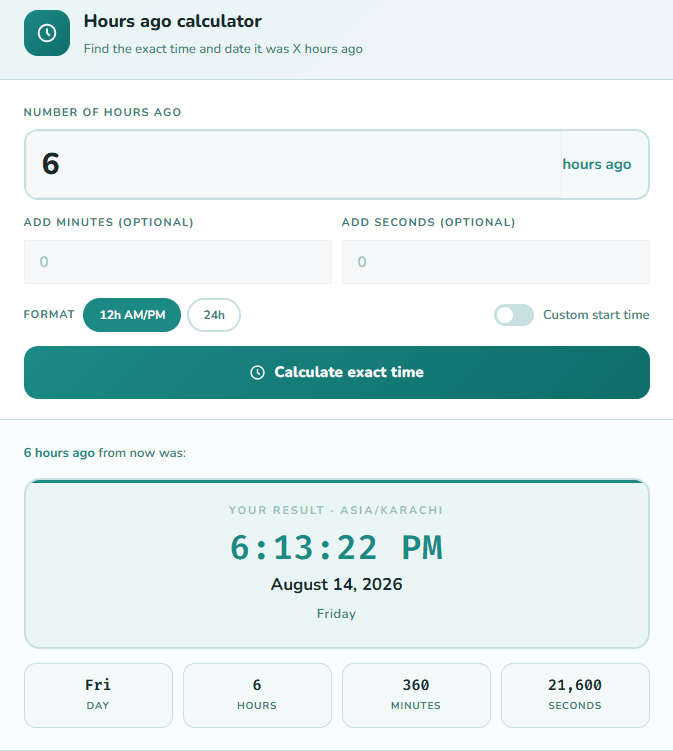
How to Use the Hours Ago Calculator
Using it takes about five seconds:
- Enter the number of hours in the main input field; whole numbers or decimals both work (1.5 is just as valid as 8)
- Add minutes and seconds in the optional fields below if you need precision beyond the hour; most tools skip this; this one doesn’t
- Choose your time format: 12-hour AM/PM or 24-hour clock, whichever you prefer.
- Toggle “Custom start time” if you want to calculate from a specific reference point instead of right now.
- Hit “Calculate exact time,” and your result appears instantly with the full date, day of the week, and a breakdown of total hours, minutes, and seconds.
- No sign-up, no loading delay, no limits on how many times you use it. If you need to go in the other direction, the hours from now calculator gives you the exact future time from any reference point.
Why This Calculator Is More Precise Than Most
Most tools in this category only accept whole hours. Type in “8” and you get an answer. Try typing “8.75” or adding 45 minutes separately, and you’re stuck doing the extra math yourself before you even reach the calculator.
This one takes hours, minutes, and seconds together, plus decimal input. Enter 1.5 hours, and it reads that correctly as 1 hour and 30 minutes, no manual conversion needed. That’s a small thing until you’re working from a timesheet, a server log, or a medication schedule that’s already in decimal or mixed format. It’s built for people who deal with timestamps as part of their actual work, not just casual curiosity. That distinction matters, and it’s the part most hours-and-minutes-ago calculators skip entirely.
Who Actually Uses an Hours Ago Calculator
This isn’t a niche tool. Here are the real situations where people reach for it every day:
Shift workers and healthcare staff
Need to know exactly when something happened relative to their shift. ‘The patient received the last dose 8 hours ago; what time was that?’ or ‘I clocked in 10 hours ago; when does my shift end?’ are the kinds of questions that need a precise answer, not a rough estimate. Once you have your exact clock-in time, our timecard calculator handles the full shift breaks, overtime, and weekly totals in one place.”
Developers and IT teams
Read server logs constantly. Log entries say things like “error at 2026-07-27T14:23:11,” but the question is always “how long ago was that from now, and what was happening 6 hours before the crash?” Going backward from a known timestamp is something this calculator handles in seconds.
See relative timestamps everywhere: “posted 4 hours ago,” “started 9 hours ago,” “live 2 hours ago.” When you need to document, report, or archive something, you need the actual time, not a floating relative label that changes every minute.
Remote teams and travelers
Deal with timezone math daily. If a colleague in another timezone says something happened “12 hours ago,” the custom start time feature lets you set their local time as the reference point and calculate the exact moment in your own timezone.
Legal and compliance professionals
Track event timelines. Incident reports, contract deadlines, and regulatory filings often require precise timestamps. “The breach was detected 36 hours ago” needs to translate into a specific date and time on record.
Students tracking deadlines
Track submission windows and deadlines. “My assignment was submitted 3 hours ago; did that fall within the 5 pm cutoff?” is a question that’s easier to answer with a calculator than mental arithmetic.
How the Calculation Actually Works
The math is straightforward. The calculator takes your current time or your custom start time, converts it to milliseconds, subtracts the hours, minutes, and seconds you entered (also converted to milliseconds), then converts the result back into a readable date and time.
Here’s what it handles automatically that manual calculation often gets wrong:
Crossing midnight
If it’s currently 2:00 AM and you enter 5 hours ago, the result rolls back to 9:00 PM on the previous day, with the correct date shown. Most people get this wrong by one day when doing it in their head.
Month and year boundaries
Going back 72 hours from March 1 means the result lands in February. The calculator handles that without you having to think about it. If you need the full gap between two specific dates in days, weeks, and months, the Date Difference Calculator gives you the complete breakdown instantly.
Decimal hours
Entering 1.5 gives you the time 1 hour and 30 minutes ago. Entering 2.75 gives you 2 hours and 45 minutes ago. Any fraction is treated as a proportion of an hour and calculated precisely, not rounded or estimated.
Timezone handling matters more than people expect
If you’re in New York and a colleague in London tells you something happened “5 hours ago” their time, plugging that number straight into a calculator that only knows your local time gives you the wrong answer. This calculator detects your browser’s timezone automatically for the “right now” calculation. When you use the custom start time option, you enter the reference time exactly as it reads in that other timezone so the math stays anchored to the correct clock.
For a live world clock reference while you work, Time and Date is the most reliable tool to verify against.
What Time Was It 24, 48, or 72 Hours Ago?
These are the most frequently searched hours ago queries on their own, outside of the general calculator. Each one has a slightly different reason people look it up.
24 Hours Ago
The same clock time yesterday. This is the highest-volume query in this category by a wide margin, usually searched to check “this time yesterday” for a deadline, a shift comparison, or a symptom onset time. Since 24 hours equals exactly one full day, the time is identical; only the date changes. If it’s currently 3:45 PM on Tuesday, it was 3:45 PM on Monday exactly 24 hours ago.
48 Hours Ago
Two full days back. Common for test result windows, return policy deadlines, and two-day compliance checks. Because it spans two midnight crossings, it’s one of the easier ones to get wrong mentally; enter 48 in the calculator, and the exact date is shown without any guesswork.
72 Hours Ago
Three days back. Frequently searched in medical contexts: symptom timelines, post-exposure windows, observation periods, and legal ones, where 72-hour notice requirements are standard. Going back 72 hours from March 1 also crosses a month boundary into February, which is exactly the kind of edge case that causes manual errors. If you’re planning instead of looking back, use the hours from now calculator for the same precision in the other direction.
8 Hours Ago
A standard full work shift back. Useful for confirming when a shift started if you only know how long ago it began, or for reading server logs where “8 hours ago” is a common reference window for incident analysis.
12 Hours Ago
Half a day back, or the exact overnight shift boundary. Common for medication timing checks and overnight IT monitoring windows.
6 Hours Ago
Common for checking social media and news timestamps, since ‘posted 6 hours ago’ is one of the most frequent relative-time labels online. Also used in newsroom workflows to verify when breaking stories were first published.
36 Hours Ago
A day and a half back. Less intuitive to calculate mentally than the others; most people can visualise 24 and 48, but 36 lands at an unfamiliar time on an unfamiliar day. This is exactly why it gets searched as its own query.
1 Hour Ago
A quick single-hour check, often used to confirm something that just happened: a sent email, a submitted form, or a recorded timestamp.
Hours to Minutes and Seconds Reference Table
Your result panel shows this automatically for each calculation, but here’s a static reference for the most common values:
| Hours ago | Total minutes | Total seconds |
| 1 | 60 | 3,600 |
| 2 | 120 | 7,200 |
| 3 | 180 | 10,800 |
| 4 | 240 | 14,400 |
| 5 | 300 | 18,000 |
| 6 | 360 | 21,600 |
| 8 | 480 | 28,800 |
| 10 | 600 | 36,000 |
| 12 | 720 | 43,200 |
| 16 | 960 | 57,600 |
| 18 | 1,080 | 64,800 |
| 20 | 1,200 | 72,000 |
| 24 | 1,440 | 86,400 |
| 36 | 2,160 | 129,600 |
| 48 | 2,880 | 172,800 |
| 72 | 4,320 | 259,200 |
| 96 | 5,760 | 345,600 |
| 120 | 7,200 | 432,000 |
| 168 | 10,080 | 604,800 |
Using Decimal Hours
Most calculators only accept whole numbers. This one accepts decimals.
Here’s how it works in practice:
- 1.5 hours ago = 1 hour and 30 minutes ago
- 2.25 hours ago = 2 hours and 15 minutes ago
- 0.5 hours ago = 30 minutes ago
- 3.75 hours ago = 3 hours and 45 minutes ago
The calculator treats the decimal as a proportion of 60 minutes. So 0.25 hours = 15 minutes, 0.5 hours = 30 minutes, 0.75 hours = 45 minutes. The conversion happens before the subtraction, so the result is accurate to the second even when your input wasn’t a clean whole number. For values more precise than a quarter-hour, use the dedicated minutes and seconds fields instead. Or if you need a standalone conversion, the hours to decimal calculator handles that separately.
Custom Start Time: Calculate From Any Reference Point
By default, the calculator uses your current time as the starting point. But sometimes you need to go back from a different reference.
Toggle the “Custom start time” switch and enter any date and time as your base. Then enter the number of hours ago you want to subtract from that point.
Real situations where this matters:
- A colleague sent a message at 9:00 AM, and you want to know what time it was 5 hours before they sent it
- A log entry is timestamped at a specific moment, and you need to find what was happening 3 hours prior
- You’re working in a different timezone and need to calculate backward from a reference time in that zone
- You want to verify what time something happened relative to a scheduled event, not relative to right now
- For adding or subtracting full-time blocks instead of calculating backward, the free time calculator handles it in one step.
Most Common Hours Ago Searches
| Hours ago | What it means | Common use |
| 1 hour ago | 60 minutes back | Quick single-hour check |
| 6 hours ago | Quarter of a day | Social media timestamps, news articles |
| 8 hours ago | Standard work shift | Shift workers, log analysis |
| 12 hours ago | Half a day | Overnight shift reference, medication timing |
| 24 hours ago | Same time yesterday | Deadlines, daily reports |
| 36 hours ago | Day and a half | Project milestones, travel timing |
| 48 hours ago | Two days back | Test results, response windows |
| 72 hours ago | Three days back | Medical protocols, legal timelines |
| 96 hours ago | Four days back | Weekly work tracking |
| 120 hours ago | Five days back | Business week lookback |
| 168 hours ago | Exactly one week | Weekly reporting cycles |
Frequently Asked Questions
What time was it 8 hours ago?
Enter 8 into the calculator and hit “Calculate exact time.” The result depends on your current time; the calculator subtracts 8 hours from right now and shows the exact time, date, and day of the week. If it crosses midnight, the date rolls back automatically.
What time was it 24 hours ago?
24 hours ago is the same clock time yesterday. If it’s currently 11:30 AM Tuesday, then 24 hours ago was 11:30 AM Monday. The time doesn’t change; only the date does.
What time was it 72 hours ago?
72 hours equals exactly 3 days. Enter 72 into the calculator to get the precise date, day of the week, and time. This is commonly used in medical protocols, legal timelines, and insurance claim reporting.
What is 1.5 hours ago?
1.5 hours ago is 1 hour and 30 minutes before the current time. Enter 1.5 in the main field, and the calculator converts it automatically.
Can I add minutes and seconds too?
Yes. Use the “Add minutes” and “Add seconds” fields below the main input. For example, entering 8 hours and 45 minutes gives you a precise result down to the second.
What if the time crosses midnight?
The calculator handles it automatically. If going back X hours pushes the result past midnight, the date rolls back to the previous day and the correct time is shown.
What’s the difference between 24 hours ago and yesterday?
24 hours ago is the same clock time exactly 24 hours back. “Yesterday” refers to the previous calendar day, which could be a different time. They only mean the same thing if you’re asking “what was the same time yesterday,” and in that case, yes, 24 hours ago equals yesterday at the same time.
Can I calculate hours ago in a different timezone?
The calculator uses your device’s local timezone automatically. For a different timezone, use the custom start time option; enter the reference time in that timezone as your starting point, then calculate backward.
Does it work for large numbers like 200 or 500 hours ago?
Yes. Enter any number of hours and the calculator handles the date arithmetic across days, months, and years correctly.
How accurate is the result?
The calculation is accurate to the millisecond. The result shown is the exact time, not an approximation based on your device clock at the moment hours-ago is calculated.
Does it handle minutes and seconds, or only whole hours?
All three, together, in one calculation. Most hours-ago calculators only take whole hours, so anything with minutes or seconds has to be converted by hand first.