A Unix timestamp converter would have saved me hours on a client project. A 13-digit number broke the login flow because the JWT exp claims were in milliseconds, but the server expected seconds. Paste any timestamp here and read it as a clear date and time in UTC, GMT, or your local time.
Unix Timestamp Converter
Convert epoch time in seconds, milliseconds, microseconds or nanoseconds to a readable date, and back.
A date string overrides the fields. Strings without an offset use your browser time.
Enter a timestamp or a date above to see the result
Quick reference: notable timestamps
Tap a row to load it into the converter
| Timestamp | Date (UTC) | Moment |
|---|---|---|
| 0 | 1970-01-01 00:00:00 | Unix epoch (time 0) |
| 946684800 | 2000-01-01 00:00:00 | Year 2000 |
| 1700000000 | 2023-11-14 22:13:20 | 1.7 billion seconds |
| 1777118400 | 2026-04-25 12:00:00 | Example from the guide |
| 1800000000 | 2027-01-15 08:00:00 | 1.8 billion seconds |
| 2147483647 | 2038-01-19 03:14:07 | 32-bit limit (Year 2038) |
Share or copy
It handles 10-digit and 13-digit timestamps, plus microseconds and nanoseconds. That covers POSIX output from backend languages, JavaScript, Java, and message brokers. I use it almost every day to check database columns, log lines, API responses, and analytics events.
Every value counts from 1970-01-01 00:00:00 UTC, with no calendars or time zones involved. Below you’ll find a plain explanation of epoch time, conversion syntax for popular programming languages, and a quick reference for scheduler triggers and cache expiration headers in any web app or mobile app.
What Is A Unix Timestamp?
A Unix timestamp has no time zone. People expect it to, and that expectation causes many bugs. It’s simply a running total of seconds since the Unix epoch, and it reads the same on a server in Tokyo as it does on a laptop in Lisbon.
The starting point is January 1, 1970, at midnight GMT. In ISO 8601, that’s written as 1970-01-01T00:00:00Z. Unix time 0 sits exactly at that moment, and you’ll also hear it called POSIX time or just epoch.
One detail surprised me early on. Unix time skips leap seconds. Every UTC day counts as exactly 86,400 seconds, which keeps the math simple even if it drifts slightly from atomic clocks.
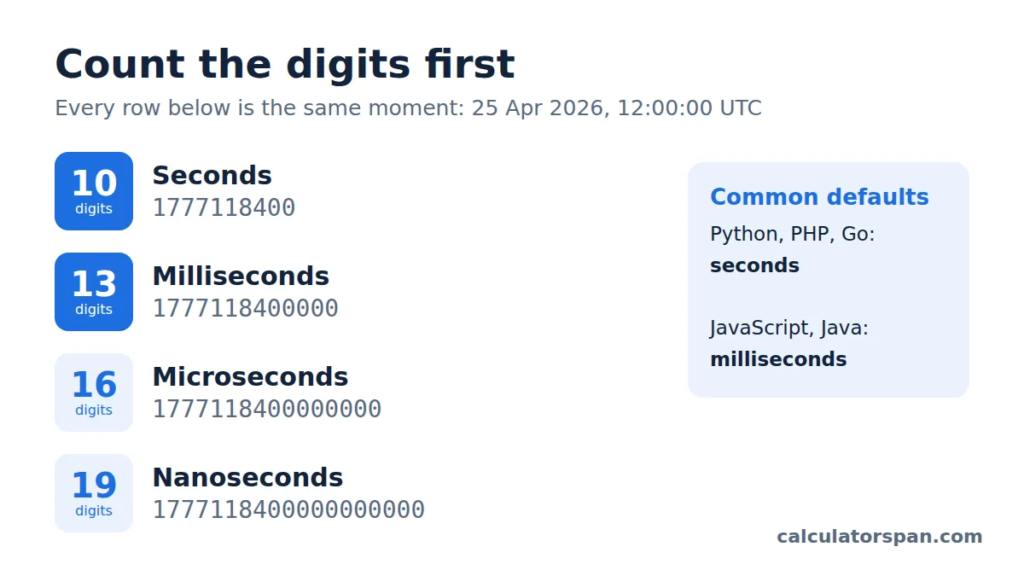
The number of digits tells you the precision:
- 10 digits means seconds
- 13 digits means milliseconds
- 16 digits means microseconds
- 19 digits means nanoseconds
I count digits before doing anything else. It saves more time than any tool.
Computers store time this way because an integer is easy to sort, compare, and track. Databases, APIs, and schedulers all book time slots with plain numbers. Distributed applications avoid arguments about whose clock is right, whether the code runs on a server or on the client side.
Older design choices still cause trouble, though. Many systems stored time as signed 32-bit integers, which run out on January 19, 2038. That’s the Year 2038 problem, and it already matters for any app that calculates dates years ahead.
How To Use And Convert A Unix Timestamp
Most bad conversions start with a wrong guess about units. So the converter checks the length of whatever you paste. A 10-digit value is read as seconds, a 13-digit value as milliseconds, and a toggle lets you override that if needed.
- Paste the value. Drop in a JWT exp, a raw number from a database row, or something copied from a log query.
- Pick your display zone. Choose UTC, your local time zone, or any zone you select. This only changes how the date appears, not the timestamp itself.
- Read the output. You get an ISO 8601 string, local time, and a relative phrase like 3 hours ago or in 2 days. I paste the ISO version into bug tickets because the offset stays attached.
- Go the other way. Fill in the date and time fields or paste a date string, and the tool gives you Unix time in the format you need.
Units: Seconds Vs Milliseconds
The worst timestamp bug I’ve fixed pushed a cache expiry about 54,000 years into the future. Someone passed milliseconds into a function that wanted seconds. Nobody noticed for weeks.
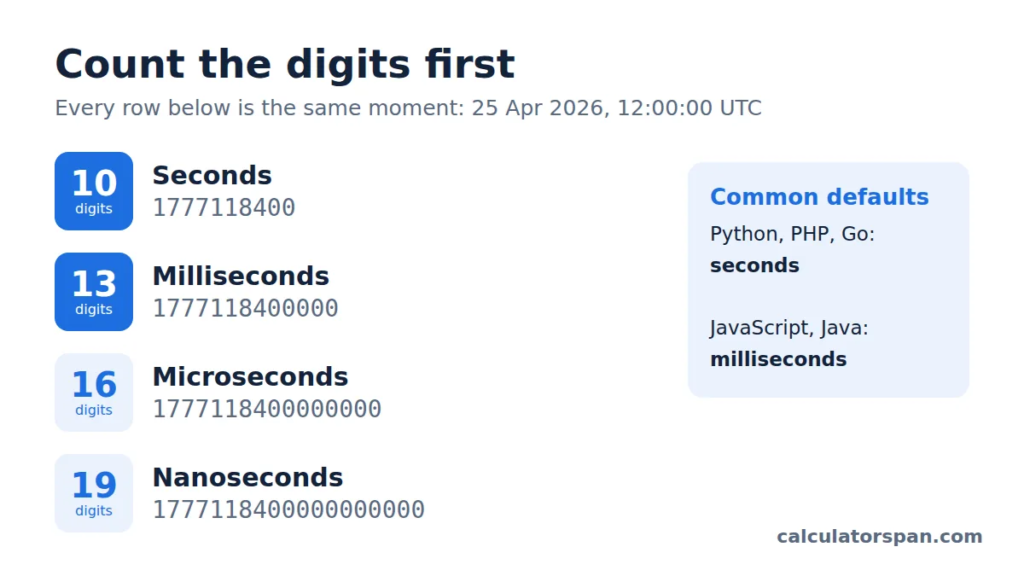
These two values point to the same moment, April 25, 2026, at 12:00 UTC:
- 1777118400 (10 digits, seconds)
- 1777118400000 (13 digits, milliseconds)
Only the unit changes. POSIX tools and most backend languages default to seconds. JavaScript and Java default to milliseconds. Message brokers vary, and some log microseconds or even nanoseconds.
Timezone Handling For Timestamps
On every project I work on, I push for storing time in UTC. Save seconds or milliseconds against UTC, then convert to local time only when a person needs to see it.
The reason is practical. Device clocks can be wrong, and daylight saving rules change from country to country. Systems that store local times end up with a duplicated hour every autumn, and the reports stop adding up.
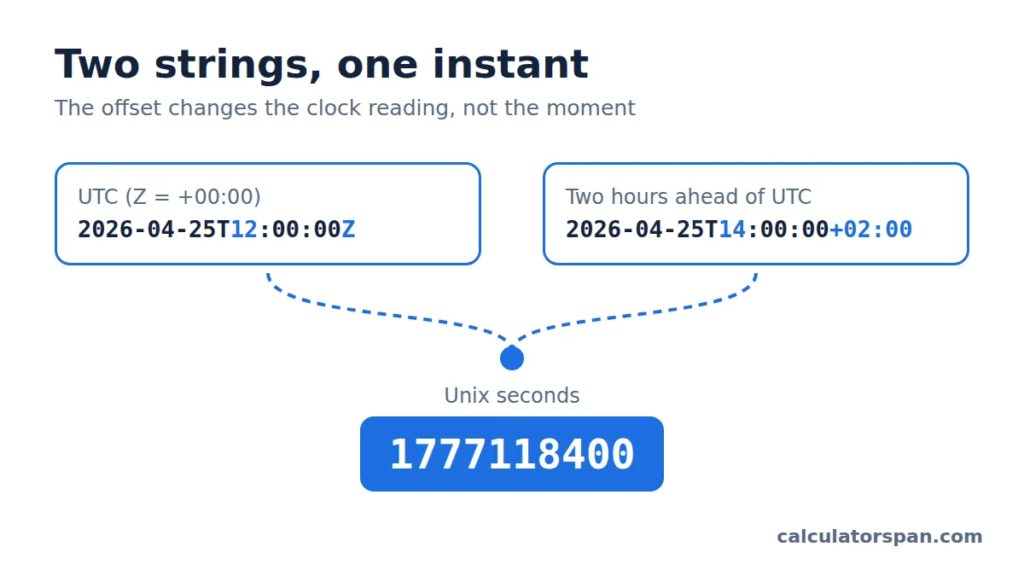
When you need text instead of a number, use ISO 8601. The Z at the end means +00:00. An offset like +02:00 means two hours ahead of UTC. So 2026-04-25T12:00:00Z and 2026-04-25T14:00:00+02:00 describe the same moment.
Before you compare ISO strings, convert them to one zone first. Raw text with different offsets sorts in the wrong order. If you need to translate a meeting time between cities rather than read a timestamp, our time zone converter is built for that job.
Use Cases For Timestamps
Timestamp conversion isn’t exciting work, but it eats a big chunk of my debugging hours. Here’s where it shows up most:
- Log tracing: Match log lines from two services by converting both to UTC.
- Cron debugging: Check whether scheduler triggers fired in local time or UTC. That mismatch explains most “missed” jobs.
- Database queries: Turn columns stored in seconds into dates before you filter.
- API response checks: Decode API responses and JWT exp claims to spot expired tokens.
- Precise comparisons: Line up analytics events down to the millisecond.
- Cache headers: Confirm when a cache expires and read it as relative time.
Human-Readable Time-to-Seconds Reference Table
Keep this handy when setting TTLs, cookie lifetimes, or token expiry values.
| Time Span | Seconds | Notes |
| 1 hour | 3,600 | Exact |
| 1 day | 86,400 | Ignores daylight saving shifts |
| 1 week | 604,800 | 7 × 86,400 |
| 1 month | 2,629,743 | Average of 30.44 days |
| 1 year | 31,556,926 | Tropical year, 365.24 days |
| 1 year (Julian) | 31,557,600 | 365.25 days |
Months and years don’t have fixed lengths. Don’t hardcode 2,629,743 for billing cycles. Use your language’s calendar functions instead.
Year 2038 Problem
This isn’t a distant issue. If you write loan schedules, insurance terms, or certificates valid past 2038, those dates cross the limit today.
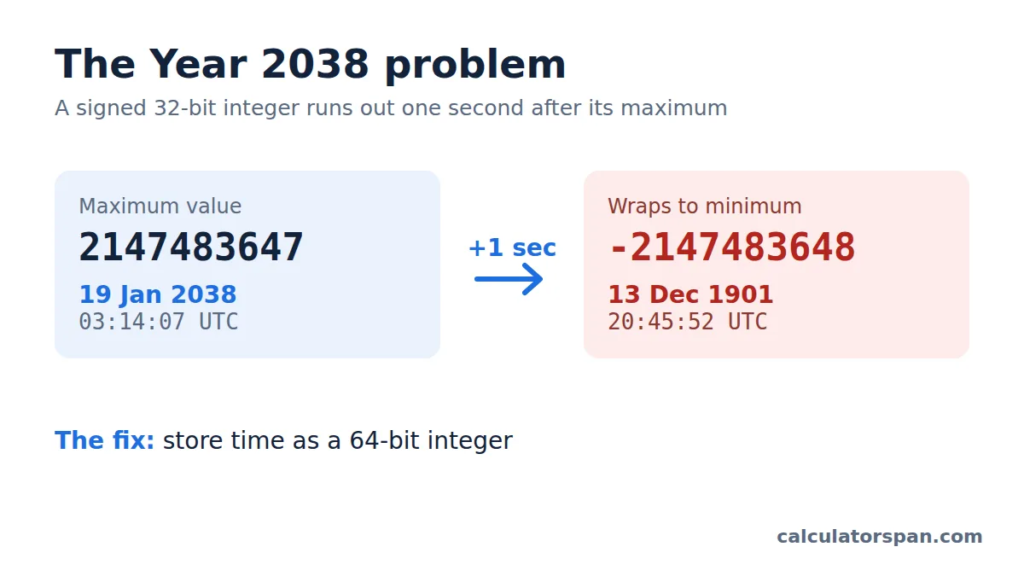
A signed 32-bit integer tops out at 2,147,483,647. That lands on January 19, 2038, at 03:14:07 UTC. One second later, the value overflows and wraps back to December 1901.
64-bit systems solve it. Modern languages and most databases now store time as 64-bit integers, which last hundreds of billions of years. No new standard is needed, just more room.
The real risk sits in older applications, embedded firmware, and legacy MySQL TIMESTAMP columns that still stop at 2038-01-19. I run a test date in 2040 through the whole stack to catch problems early.
Code Examples For Programming Languages
Every language handles epoch time a little differently, and the seconds versus milliseconds trap shows up again. All examples use 1800000000 seconds, which equals January 15, 2027, 08:00 UTC, so you can check your output.
| Language | Current Epoch Time | Epoch To Readable Date |
| Python | import time; time.time() | time.ctime(1800000000) |
| PHP | time() | date(‘Y-m-d H:i:s’, 1800000000) |
| JavaScript | Math.floor(new Date().getTime() / 1000) | new Date(1800000000 * 1000).toLocaleString() |
| Java | System.currentTimeMillis() / 1000 | new SimpleDateFormat(“yyyy-MM-dd HH:mm:ss”).format(new java.util.Date(1800000000L * 1000)) |
| Ruby | Time.now.to_i | Time.at(1800000000) |
| Go | time.Now().Unix() | time.Unix(1800000000, 0) |
| C# | DateTimeOffset.Now.ToUnixTimeSeconds() | DateTimeOffset.FromUnixTimeSeconds(1800000000).LocalDateTime |
| PostgreSQL | SELECT EXTRACT(EPOCH FROM now()); | SELECT TO_TIMESTAMP(1800000000); |
| MySQL | SELECT UNIX_TIMESTAMP(NOW()); | SELECT FROM_UNIXTIME(1800000000); |
| SQL Server | SELECT DATEDIFF(SECOND, ‘1970-01-01’, GETUTCDATE()); | SELECT DATEADD(SECOND, 1800000000, ‘1970-01-01’); |
| SQLite | SELECT unixepoch(); | SELECT datetime(1800000000, ‘unixepoch’, ‘localtime’); |
| Linux Shell | date +%s | date -d @1800000000 |
| macOS | date +%s | date -j -r 1800000000 |
| PowerShell | [DateTimeOffset]:: NowToUnixTimeSeconds() | [DateTimeOffset]:: FromUnixTimeSeconds(1800000000).LocalDateTime |
| Excel | =(NOW()-25569)*86400 | =A1/86400+25569 (format as date) |
A few notes from real projects:
- JavaScript: Date methods return milliseconds, so divide by 1000 and use Math. floor when an API wants seconds. The MDN Date reference covers the details.
- C# on older .NET: Use new DateTime(1970, 1, 1, 0, 0, 0, DateTimeKind.Utc).AddSeconds(1800000000) since the helper methods aren’t available.
- Python: datetime.fromtimestamp() returns local time unless you pass a timezone. The official datetime docs explain the tz argument.
- Excel: Dates count days from 1900. Divide by 86,400 and add 25,569, the serial number for January 1, 1970. NOW() uses your machine’s local time, not UTC.
- SQLite: unixepoch() needs version 3.38 or newer.
Unix Timestamp vs ISO 8601: Which Format to Store
A Unix timestamp isn’t always the right choice. I decide based on who reads the value: a machine, a person, or both.
| Format | Example | Best For |
| Unix seconds | 1777118400 | Backend logs, JWT exp, POSIX time(), Redis TTLs |
| Unix milliseconds | 1777118400000 | JavaScript Date.now(), Java System.currentTimeMillis() |
| ISO 8601 | 2026-04-25T12:00:00Z | REST APIs, JSON, GraphQL, log files |
| ISO 8601 with offset | 2026-04-25T14:00:00+02:00 | User-facing scheduling, calendar invites |
| RFC 2822 | Sat, 25 Apr 2026 12:00:00 GMT | Email headers, HTTP Date, Last-Modified |
| Date only | 2026-04-25 | Birthdays, holidays |
Date-only values don’t belong in epoch math. Store a birthday as midnight UTC, and it shows up a day early for half your users.
The factor of 1000 is the classic mistake. Read 1700000000 as milliseconds, and you get January 1970. Read it as seconds, and it’s November 2023. When a converted date is decades off, check the unit first.
Parsing a date string without an offset makes the system guess using the server’s local zone. That’s why formatted dates drift during daylight saving transitions. Keep UTC as your source of truth.
Repeating events are the exception. A 9 a.m. weekly meeting has to follow its own region’s daylight saving rules, so I store the local rule alongside the UTC value.
For security deadlines like token expiry and one-time passwords, trust the server clock, never the device. I allow 30 to 60 seconds of skew, because phone clocks drift more than you’d expect.
Read An API Timestamp
Say an endpoint returns this JSON:
json
{ “id”: 42, “createdAt”: 1777118400, “expiresAt”: 1777204800 }
Both values have 10 digits, so they’re Unix seconds. The record was created April 25, 2026, at 12:00 UTC and expires exactly 24 hours later. If the expiry is in the past, the record is dead. If it’s in the future, it’s still valid.
JavaScript-heavy backends often send milliseconds instead. Never assume. Check the API docs before you treat any value as seconds.
Compare UTC And Local Time
2026-04-25T12:00:00Z and 2026-04-25T14:00:00+02:00 are the same instant. The +02:00 offset only changes what the clock shows.
My rule is simple: store moments in UTC, show local time to people. Mixing both in one database column is how reports end up counting an hour twice.
Frequently Asked Questions
Does It Support Both Seconds And Milliseconds?
Yes. Paste a 10-digit timestamp in seconds or a 13-digit one in milliseconds, and the tool detects it automatically. To go backwards, enter the year, month, day, hour, minute, and second.
What Conversion Results Can I Copy?
You can copy every result with one click: the timestamp in seconds, the value in milliseconds, an ISO 8601 string, UTC, local time, and relative time.
Which Time Zone Does The Converter Show?
It shows UTC by default and reads your local time from your browser. You can switch the display to another zone without changing any system settings.
What Is A Unix Timestamp?
A Unix timestamp, also called epoch time, is a single number counting seconds or milliseconds since 1970-01-01 00:00:00 UTC. It marks one exact moment, no matter where you are.
Why Are Some Timestamps 10 Digits And Others 13?
A 10-digit timestamp counts seconds. A 13-digit one counts milliseconds. JavaScript’s Date.now() returns milliseconds, while most backends in Python, PHP, and Go use seconds.
What Does UTC Mean?
UTC stands for Coordinated Universal Time, the global reference clock. It never shifts for daylight saving, which is why databases, APIs, and logs rely on it.
Why Does JavaScript Use Milliseconds?
JavaScript built its Date object on milliseconds for finer precision in the browser. Both Date.now() and new Date(). getTime ()getTime() return milliseconds, while most other languages use seconds. That gap causes most off-by-1000 bugs.
How Do I Convert A Unix Timestamp To A Date?
In JavaScript, multiply seconds by 1000 and pass the result to new Date(). In Python, use datetime.fromtimestamp(). Or paste the value into this converter and get the answer instantly.
Will Unix Timestamps Overflow?
Signed 32-bit timestamps overflow on 2038-01-19, known as the Year 2038 problem. Modern languages and databases use 64-bit integers, which push the limit out hundreds of billions of years.
How Do I Turn A Timestamp Into A Readable Date?
Paste it into the converter. You’ll see the date and time in your local zone, in UTC, and in any other zone you pick.
Can I Convert A Normal Date Into A Unix Timestamp?
Yes. Open the Date Time to Unix tab, enter the date and time, and you’ll get the timestamp in both seconds and milliseconds.
Does A Unix Timestamp Change Across Time Zones?
No. The number stays identical everywhere. Only the displayed date and time change depending on the zone you view it in.