Most people think about the year as something moving forward. Weeks completed, months elapsed, progress made. Flip that entirely, and something useful happens: the remaining runway becomes concrete, and every goal, deadline, and decision snaps into a computable frame.
That is what weeks left in the year actually gives you. Not a motivational number. A planning number.
Weeks Left in the Year
See exactly how much of 2026 is still ahead of you.
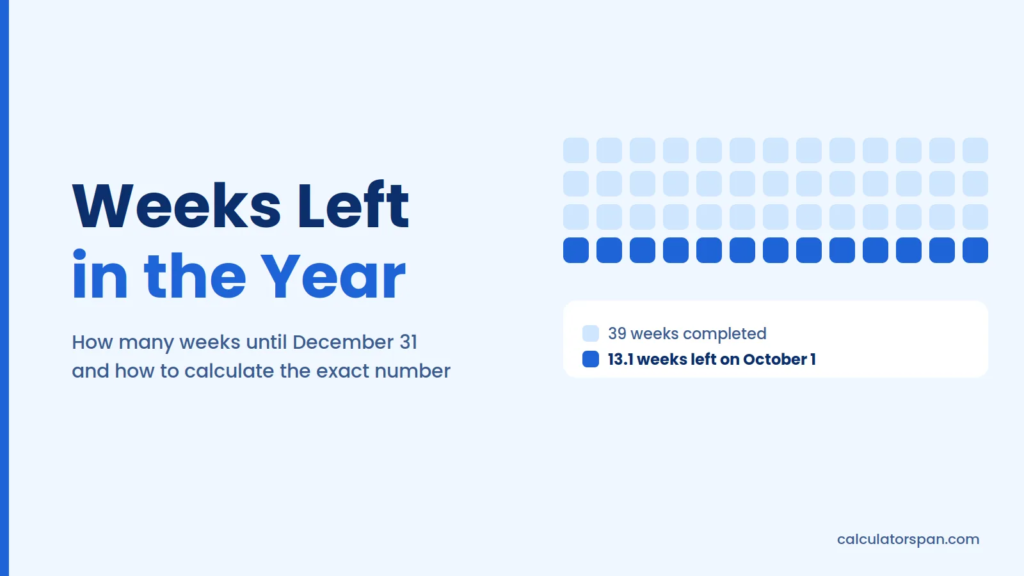
How Many Weeks Are Left in the Year?
The answer changes every day, which is why the calculator above exists. But the math behind it never changes, and understanding it makes the number more useful, not less.
A standard calendar year contains 365 days. Divide that by 7, and you get 52.14 weeks. Never a clean integer, always carrying a remainder. A leap year stretches to 366 days, producing 52.29 weeks. Neither divides evenly, which means every year ends mid-week by mathematical necessity. That leftover fraction is not a rounding error. It is the exact structural truth of how calendars work.
The weeks remaining figure the calculator returns is your remaining runway expressed in the most actionable unit available. Not months; those are uneven and hard to divide against. Not quarters, too coarse for deadline work. Weeks are fixed at 7 days, which makes them the cleanest denominator for any planning math you want to run.
How to Calculate Weeks Left in the Year
There are two reliable methods. Both work. Neither requires a calculator if you are comfortable with basic arithmetic.
Method 1: Count the Days and Divide
This is the most accurate approach. Here is how it works step by step.
Step 1: Fix your start date precisely
Do not treat today loosely. Name the month, name the day, confirm it matches your local date before running any subtraction. Off-by-one errors on the start date are the single most common source of wrong week counts, and they cascade through every calculation that follows.
Step 2: Find days remaining in the current month
Take the total number of days in your current month and subtract today’s date. If today is the 10th of a 30-day month, you have 20 days left in that month. That partial-month fragment is what most mental estimates skip, and it adds up to nearly a full week when you are mid-month.
Step 3: Add the full remaining months
After the current month closes, every remaining month contributes its complete day count. Add each month individually; do not estimate “roughly three months.” July has 31 days, September has 30, and the difference between those matters when you are trying to land on an accurate total.
| Month | Days |
| January | 31 |
| February | 28 (29 in a leap year) |
| March | 31 |
| April | 30 |
| May | 31 |
| June | 30 |
| July | 31 |
| August | 31 |
| September | 30 |
| October | 31 |
| November | 30 |
| December | 31 |
Step 4: Add everything together
Combine the partial current month from Step 2 with all the full months from Step 3. That sum is your total days remaining in the year, exact and unambiguous. Write it down before moving to the next step.
Step 5: Divide by 7
Take your total days remaining and divide by 7. The result is your weeks remaining figure, almost certainly a decimal, which is exactly what you want. A result of 14.6 means 14 full weeks and roughly four extra days. Do not round up. Those days are real planning time, not phantom weeks.
Method 2: Subtract the Current Week Number
This approach is faster but requires one piece of information most people do not check: whether your current year contains 52 or 53 ISO weeks.
The ISO 8601 standard defines weeks as running Monday through Sunday. When January 1 falls on a Thursday in a standard year, or on a Wednesday or Thursday in a leap year, the year expands to 53 ISO weeks instead of 52. This happens more often than most people realize, and if you subtract from the wrong total, your weeks remaining figure shifts by an entire week.
Once you know your year total, the method is simple. Find your current week number; any ISO-compliant calendar or date tool displays this, then subtract it from the year total. Adjust for the partial current week, and you have your weeks remaining.
| What to Check | Why It Matters |
| Is this a 52- or 53-week ISO year | Changes the denominator for subtraction |
| What day of the week is today | Determines partial week adjustment |
| Are you counting calendar or work weeks | Completely different numbers |
The subtraction method is useful for a quick estimate. The day-count method is what you use when accuracy matters.
Excel and Google Sheets Formulas for Weeks Remaining
Both of these update automatically every time you open the file. No manual input required once they are in place.
Whole weeks remaining floors the result:
=INT((DATE(YEAR(TODAY()), 12, 31) – TODAY()) / 7)
Rounded weeks remaining rounds to the nearest week:
=ROUND((DATE(YEAR(TODAY()), 12, 31) – TODAY()) / 7, 0)
The only difference between them is the outer function. INT rounds down — so if 14.8 weeks remain, it returns 14. ROUND returns 15. Neither is wrong. They answer different questions.
| Formula | Returns | Best For |
| INT version | Conservative whole weeks | Hard deadlines, delivery tracking |
| ROUND version | Nearest whole week | Capacity planning, goal sizing |
Use INT when you need to confirm that time definitely exists. Use ROUND when you are estimating how much work fits.
Why the Answer Is Never a Whole Number
This confuses people, and it should not. The math is straightforward.
365 divided by 7 is 52.142857. Not 52. Not 53. A number with a decimal that never resolves cleanly because 7 does not divide into 365 without a remainder. That remainder one day in a standard year, two days in a leap year is what causes your birthday to land on a different weekday every year.
| Year Type | Total Days | Exact Weeks | Remainder |
| Standard year | 365 | 52.14 | 1 day |
| Leap year | 366 | 52.29 | 2 days |
That two-day remainder in a leap year is also why events drift two weekday positions forward after a leap year instead of one. It is not a quirk. It is arithmetic made visible.
The practical implication for planning: stop trying to round your weeks remaining to a whole number. The decimal tells you something. 14.6 weeks is not “almost 15 weeks” for deadline purposes; it is 14 full weeks and 4 days. Those 4 days either exist in your schedule or they do not.
Leap Years: How They Work and Why They Matter
Leap years follow a three-part rule that most people only half-remember.
Rule 1: Any year divisible by 4 is a leap year. This catches 2024, 2028, 2032.
Rule 2: Exception: years divisible by 100 are not leap years, even if they pass Rule 1. This makes 1900 and 2100 standard years despite being divisible by 4.
Rule 3: Exception to the exception: years divisible by 400 are leap years regardless. This is why 2000 was a leap year while 1900 was not.
| Year | Divisible by 4 | Divisible by 100 | Divisible by 400 | Leap Year? |
| 2024 | ✅ | ❌ | ❌ | ✅ Yes |
| 2100 | ✅ | ✅ | ❌ | ❌ No |
| 2000 | ✅ | ✅ | ✅ | ✅ Yes |
| 1900 | ✅ | ✅ | ❌ | ❌ No |
Pope Gregory XIII introduced this correction in 1582 when the Gregorian calendar replaced the Julian system. Earth takes approximately 365.2422 days to orbit the Sun, not exactly 365. Without the leap year correction, the calendar drifts roughly one day every four years, which means seasons shift over centuries. Christmas would eventually land in summer without it.
For weeks-remaining purposes, the leap day sits at the front of the year, so it only affects your count while it’s still ahead of you. A calculation run in January or February of a leap year carries one extra day compared with a standard year. From March 1 onward, February 29 is behind you, and the remaining-days figure matches a standard year exactly.
52 Weeks vs 53 Weeks: The ISO Week Year Explained
This is the detail that breaks the most calculations.
The ISO 8601 standard defines the first week of the year as the week containing the first Thursday of January. That rule means the ISO week year does not start on January 1; it starts on the Monday of the week that contains January 4. In practice, this means ISO week 1 sometimes begins in late December of the previous calendar year.
The consequence: some years contain 53 ISO weeks instead of 52. This happens when January 1 falls on a Thursday in a standard year, or on a Wednesday or Thursday in a leap year.
| Scenario | ISO Weeks in Year |
| Most years | 52 |
| Jan 1 falls on Thursday (standard year) | 53 |
| Jan 1 falls on Wednesday or Thursday (leap year) | 53 |
Why this matters for your calculation: if you are in a 53-week year and you subtract your current week number from 52, your weeks remaining figure is short by one full week. That is not a rounding difference. It is a planning error.
Always confirm whether you are in a 52- or 53-week ISO year before using the subtraction method. The day-count method avoids this problem entirely because it does not depend on week numbers at all.
What People Actually Use This Number For
Goal Tracking
This is the most personal application. If you set an annual reading goal of 24 books and you have read 14, you need 10 more. Divide 10 by your remaining weeks to get a weekly rate. That rate either fits your schedule, or it tells you the goal needs adjusting before December reveals the gap rather than after.
Weeks work better than months for this math because weeks are fixed at 7 days. Months range from 28 to 31 days, which makes rate calculations inconsistent. A weekly rate is the same denominator every time, which is why goal-tracking systems built on weeks are more accurate than systems built on months. If your goal has its own deadline rather than running to year-end, the days-until calculator counts to any date you pick.
Project Planning
Experienced teams use week counts before committing to scope, not after. If a project needs 16 weeks of work and you have 11 weeks remaining, the schedule overrun is visible before you start, not at week 9 when deadline pressure has closed every option except overtime.
The week count converts “we have Q4” into “we have 13 weeks,” a specific number that either supports the proposed scope or forces a scope conversation while there is still time to have it productively. Once you know your weeks remaining, convert that figure into actual working days with our working days calculator. The gap between calendar weeks and work weeks is bigger than most project plans account for.
Holiday and Travel Planning
Christmas falls six days before year-end, which means holiday planning and year-end goal finalization compete for the same final weeks. Knowing your actual weeks remaining, not a vague sense of “a couple of months,” surfaces how much lead time you actually have for ticket purchases, accommodation bookings, and gift procurement before December compresses everything.
Financial Year-End
Tax-loss harvesting, 401(k) contributions, and business expense deadlines all close on December 31 with zero flexibility.
| Financial Deadline | Lead Time Needed | Start Point in Weeks |
| Tax-loss harvesting | 4-6 weeks | Mid-November |
| IRA contributions | 4 weeks | Early December |
| Business expenses | 6-8 weeks | Late October |
| Contract cancellations | 4-8 weeks | Varies by contract |
Checking weeks remaining in October rather than November is the difference between managing these windows and missing them. By the time urgency feels real, fewer than six usable weeks usually remain.
Subscription and Contract Clocks
Many subscriptions and contracts auto-renew on January 1. Most cancellation windows require 30 to 60 days’ notice, which means a December 31 renewal needs action in October or November. The weeks remaining figure, applied to contract review, converts passive financial exposure into a calendar item with a deadline.
Personal Reflection
Checking weeks remaining mid-year and late-year produces two different questions worth asking separately. At the midpoint, the question is what is still possible. At the two-thirds mark, the question is what is actually probable given what has happened so far. The math answers both with the same input: weeks remaining, counted honestly.
How the Year Looks Week by Week
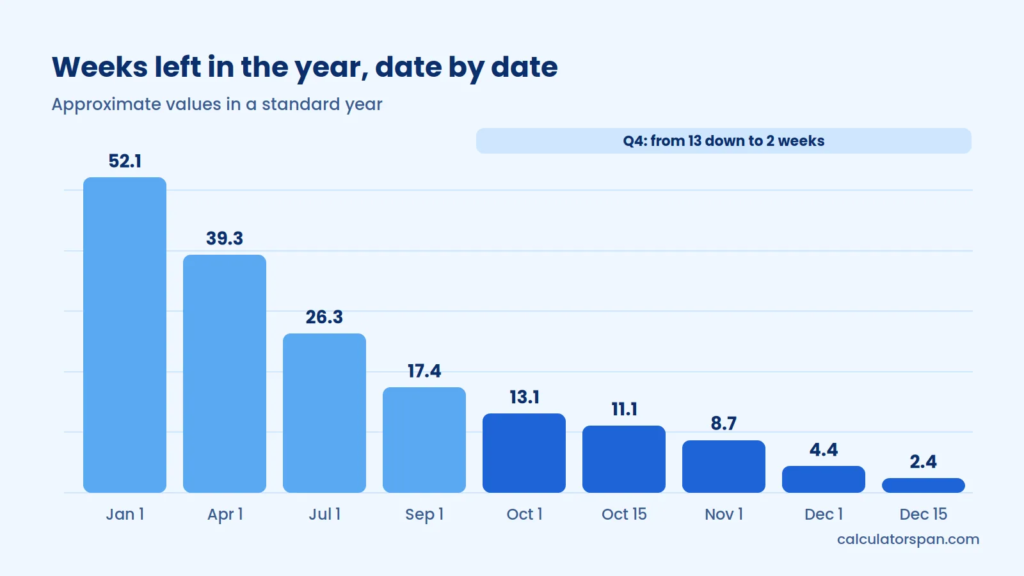
Some reference points that put the numbers in context:
| Date | Approx Days Left | Approx Weeks Left | Context |
| January 1 | 365 | 52.1 | Full year ahead |
| April 1 | 275 | 39.3 | Q1 closed |
| July 1 | 184 | 26.3 | Mid-year |
| September 1 | 122 | 17.4 | Final third begins |
| October 1 | 92 | 13.1 | Q4 opens |
| October 15 | 78 | 11.1 | Q4 gets serious |
| November 1 | 61 | 8.7 | Home stretch |
| December 1 | 31 | 4.4 | Final month |
| December 15 | 17 | 2.4 | Two weeks out |
The Q4 compression is visible in this table in a way that monthly thinking obscures. The gap between October 1 and December 1 is only two months, but it contains virtually every important year-end decision, deadline, and financial window. Thirteen weeks of runway at the start of October shrinks to four weeks by December 1 faster than most planning systems account for.
Common Mistakes That Break the Calculation
Off-by-one on the start date
Using today as start-of-day versus end-of-day produces a one-day discrepancy in days remaining. That sounds negligible until you are at a boundary where the difference between 13 and 14 weeks changes a real scheduling decision.
Confusing calendar weeks with work weeks
Your weeks remaining figure counts calendar weeks, all 7 days. A 13-week runway contains 91 calendar days but only 65 working days, assuming a 5-day week. Project planning that ignores this distinction consistently underestimates time requirements. The working days calculator gives you the business-day figure directly.
Using the wrong ISO year total
Subtracting your current week number from 52 in a 53-week year understates your remaining weeks by one. This error is invisible until you compare results with someone using the day-count method and find a full-week discrepancy.
Rounding too early
Converting your decimal to a whole number before running goal math produces compounding errors. Keep the decimal through all your calculations and round only the final output for human-readable display.
| Mistake | Effect | Fix |
| Off-by-one start date | 1-day error in total | Confirm exact date before calculating |
| Calendar vs work weeks | 26-day undercount over 13 weeks | Specify which unit you mean |
| Wrong ISO year total | Full week error | Check 52 vs 53 first |
| Premature rounding | Compounding decimal errors | Round last, not first |
Frequently Asked Questions
How is weeks left calculated?
The calculation runs from your chosen start date to December 31, treated as inclusive through the end of the day. Total days remaining are divided by 7 using standard calendar weeks running Monday through Sunday. The result is rounded down to isolate complete weeks from the partial remainder.
What is the Excel formula for weeks remaining in the year?
For whole weeks: =INT((DATE(YEAR(TODAY()), 12, 31) – TODAY()) / 7). For rounded weeks: =ROUND((DATE(YEAR(TODAY()), 12, 31) – TODAY()) / 7, 0). Both update automatically each time the spreadsheet recalculates.
Does the calculator account for leap years?
Yes. Leap year detection is automatic and applies the full three-rule Gregorian system: divisible by 4, except centuries unless divisible by 400. The total days figure adjusts to 365 or 366 accordingly without any manual input.
Why is the answer never a whole number?
Because 365 and 366 are not multiples of 7. A standard year contains 52 weeks and 1 extra day. A leap year contains 52 weeks and 2 extra days. Those remainders produce the decimal in every weeks remaining result, and they are the same remainders that cause weekdays to drift forward each year.
Can I count weeks until a date other than year-end?
This calculator targets December 31 specifically. For arbitrary date ranges, a date difference calculator with a divide-by-7 step handles the calculation. The design choice is intentional: a fixed endpoint makes results comparable across dates and users.
Why do my weekdays drift one day each year?
Because 365 equals 52 weeks plus 1 extra day. That single surplus advances every fixed-date event by one weekday the following year. Leap years produce a 2-day drift: 366 equals 52 weeks plus 2 extra days, which is why a birthday on Tuesday before a leap year lands on Thursday afterward.
Does the time of day affect the result?
For practical planning purposes, the answer is no. The calculator anchors to end-of-day December 31 as the terminal point and treats your start as the beginning of the chosen date. Time-of-day differences only surface as meaningful variables when comparing results across time zones at exact midnight boundaries, which is not relevant for any normal planning use.
Is my date input stored or sent anywhere?
No. The calculation runs entirely in the browser using JavaScript. Nothing is transmitted to a server, nothing is logged, and nothing is retained after you close the tab. You can verify this by checking network activity in your browser’s developer tools; no outbound requests are tied to your date input.