Time Calculator
Use this free time calculator to add or subtract hours, minutes, and seconds, or find the exact time between two dates. Results show up instantly, and there’s nothing to sign up for or download.
Starting time
Start date and time
End date and time
- Total hours
- 0
- Total minutes
- 0
- Total seconds
- 0
What is a time calculator?
A time calculator does math with hours, minutes, and seconds the way a clock does, in base 60 instead of base 10.
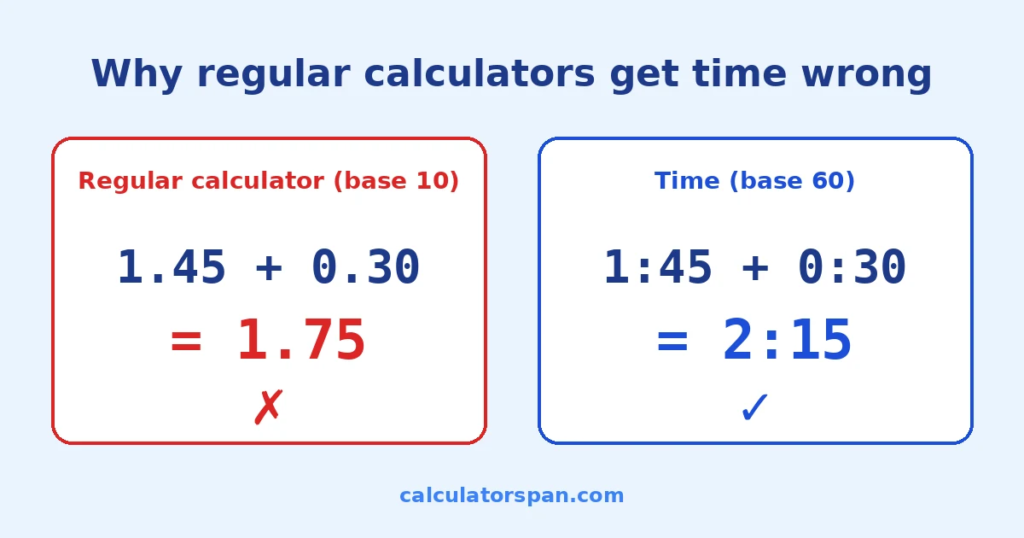
On a regular calculator, 1.45 + 0.30 gives you 1.75. But if you meant 1 hour 45 minutes plus 30 minutes, the real answer is 2 hours 15 minutes. An hour has 60 minutes, not 100, so ordinary arithmetic breaks as soon as a total passes the hour mark. This tool handles that conversion for you.
How to use the time calculator
There are three tabs at the top. Pick the one that fits what you’re working out, fill in the fields, and press Calculate. Reset clears everything.
Add time
Enter your first time in hours, minutes, and seconds, then your second. If you have more, press Add another time for a new row. You can add up to 10 times in one go, and you can remove any extra row with the × next to it.
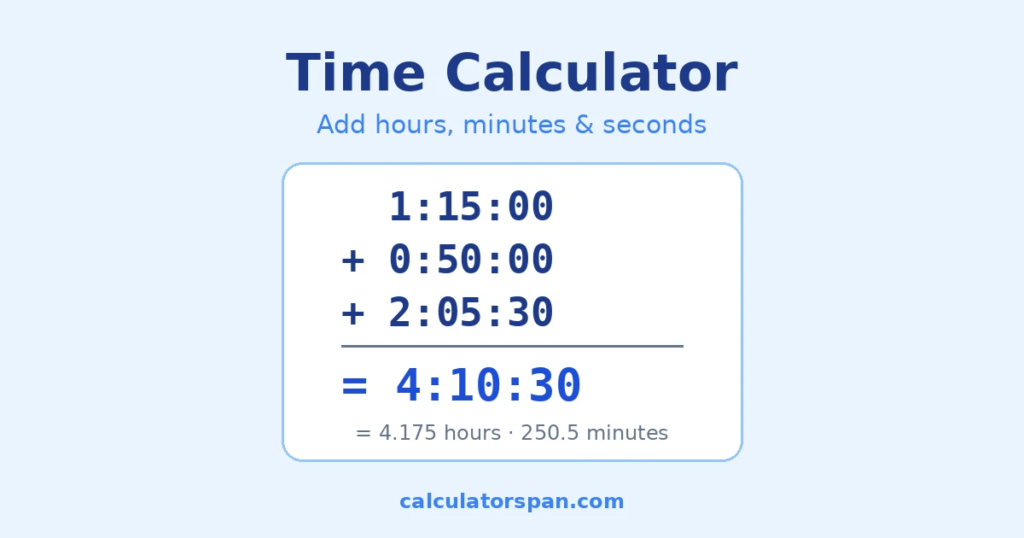
Example: 1:15:00 + 0:50:00 + 2:05:30 = 4:10:30. That’s the kind of total you’d need when logging three work sessions or adding up the legs of a trip.
Subtract time
Enter the starting time, then the duration you want to take away. The result is what’s left.
Example: you have 5 hours 30 minutes before a deadline, and your next task takes 1 hour 45 minutes. Subtract, and you have 3:45:00 left.
If the duration is longer than the starting time, you’ll see the result in red with a minus sign and a short note, so you know to check your numbers.
Time between two dates and times
Enter a start date and time, then an end date and time. The calculator gives you the full duration in hours, minutes, and seconds, plus a breakdown in days when the gap is longer than 24 hours. Month lengths and leap years are handled automatically.
Example: from September 1 at 8:00 AM to September 3 at 5:30 PM is 57:30:00, or 2 days, 9 hours, and 30 minutes.
If you only need calendar days, weeks, or months between two dates, the Date Difference Calculator is faster. For business days only, use the Working Days Calculator. If both times are on the same day or overnight and you don’t need dates, the Time Duration Calculator is quicker. Enter two clock times, including 24-hour times like 0630, and get the hours and minutes between them.
Reading, copying, and sharing your result
Every result shows the answer in HH:MM:SS, along with the same amount as total hours, total minutes, and total seconds. The decimal hours figure is handy for timesheets and invoices.
Press Copy result to copy the full calculation, totals, and page link, ready to paste into a message or spreadsheet. You can also share straight to WhatsApp, Facebook, X, LinkedIn, or Telegram. On a phone, the Share button opens your device’s share menu.
Why regular calculators get time wrong
Time is counted in base 60. Sixty seconds make a minute and sixty minutes make an hour, a system that goes back to ancient Babylon. Everyday calculators count in base 10, and that mismatch causes two common mistakes.
Adding. Add 45 minutes and 25 minutes, and you get 70 minutes. Write that as 1.70 hours and you’re wrong; it’s 1 hour 10 minutes. Small slips like this end up on timesheets and client invoices.
Subtracting. Taking 1:45:30 away from 3:10:05 means borrowing from the minutes and then from the hours. Miss one step and the answer is off. The correct result is 1:24:35.
The calculator converts everything to seconds, does the math, and converts back, so neither mistake can happen.
How to add and subtract minutes and seconds
Plenty of people use this page as a minute calculator. You don’t need hours at all; just leave the hours field empty or at 0.
Minutes
55 minutes plus 25 minutes is 80 minutes, which the calculator shows as 1:20:00. Subtraction works the same way across the hour line: 1:10:00 minus 0:25:00 gives 0:45:00. This comes up with cooking times, workout intervals, meeting blocks, and break tracking.
Seconds
Seconds roll over into minutes the same way. Two video clips of 3:45 and 2:30 add up to 6:15, not “5 minutes 75 seconds.” And 45 seconds plus 30 seconds is 0:01:15. If you work in video editing, audio, sports timing, or lab work, this saves you from fixing the overflow by hand.
Common uses for a time calculator
Work and freelancing. Total the hours from several sessions before you send a timesheet or invoice. If you need a full weekly timesheet with breaks deducted, the Timecard Calculator is built for that. In the US, non-exempt employees must be paid overtime for hours over 40 in a workweek under the Fair Labor Standards Act, so accurate totals matter. The U.S. Department of Labor explains the overtime rules, and our Time and a Half Calculator works out the pay.
Project planning. Subtract task durations from the time you have left to see whether the plan fits before the deadline arrives.
Travel. Add flight time, layovers, and transfers to get the real door-to-door time. To find the clock time you’ll land, try the Arrival Time Calculator. Crossing time zones? Check the local time with the Time Zone Converter.
Fitness and study. Add up workout blocks or study sessions to see if you hit your target for the day.
Video, audio, and events. Total clip lengths, recording segments, or conference sessions to see how much time they fill.
Time unit conversion chart
| Unit | Equals |
| 1 minute | 60 seconds |
| 1 hour | 60 minutes / 3,600 seconds |
| 1 day | 24 hours / 1,440 minutes / 86,400 seconds |
| 1 week | 7 days / 168 hours / 604,800 seconds |
| 1 month (average) | about 30.44 days / about 730.5 hours |
| 1 year | 365 days / 8,760 hours |
| 1 leap year | 366 days / 8,784 hours |
This page covers adding, subtracting, and measuring durations. For other time questions, these tools do one job each:
- Hours From Now Calculator: find the clock time and date a set number of hours ahead.
- Hours Ago Calculator: find the clock time and date a set number of hours back.
- Hours and Minutes to Decimal Calculator: turn HH:MM into decimal hours for payroll.
- Decimal to Time Calculator: turn decimal hours back into hours and minutes.
- Break Time Calculator: work out breaks for a shift.
- Date Calculator: add or subtract days, weeks, or months from a date.
- Lead Time Calculator: plan supplier and production lead times.
- Age Calculator: get an exact age in years, months, and days.
- Military Time Converter: switch between 12-hour and 24-hour time.
- Countdown Timer: count down to a set time in your browser.
- How Long Until 12:00 AM: see how much time is left until midnight.
Frequently asked questions
How do I add hours and minutes without a calculator?
Turn everything into minutes, add them, then convert back. For 1 hour 30 minutes plus 45 minutes: 90 + 45 = 135 minutes, which is 2 hours 15 minutes. For seconds, convert everything to seconds first.
What is 55 plus 25 in minutes?
80 minutes, which is 1 hour 20 minutes. The calculator shows it as 1:20:00.
How do I subtract time from time?
Open the Subtract Time tab, enter the starting time, then the amount to take away. The calculator does the borrowing between seconds, minutes, and hours for you.
Can I add more than two times?
Yes. On the Add Time tab, press Add another time to add rows, up to 10 times in total.
Why can’t I use a regular calculator for time?
Regular calculators work in base 10, and time works in base 60. Typing 1.45 into a normal calculator means 1.45 hours, which is 1 hour 27 minutes, not 1 hour 45 minutes.
Can I calculate time across midnight?
Yes. The Time Between tab takes a date with each time, so a span from 10:00 PM to 3:00 AM the next day comes out as 5 hours. On the Add Time tab, totals over 24 hours keep counting: 22:00 plus 3:00 shows 25:00:00, with a note that it equals 1 day and 1 hour. If you want the actual clock time instead, use the Hours From Now Calculator.
Does the Time Between tab adjust for daylight saving time?
No. It counts calendar time between the two dates and times you enter. If a clock change falls inside your range, the real elapsed time will be one hour more or less than the result.
Does this calculator handle seconds?
Yes. Every tab accepts seconds and shows results in full HH:MM:SS.
Is this calculator free?
Yes. There’s no account, no download, and no limit on how many calculations you run.
Disclaimer
This tool gives general time calculations for informational purposes. Check results independently before using them for payroll, legal, or financial decisions.