The Time to Decimal Calculator converts any time value into decimal hours, accurate to the second. Use it for billing, invoicing, payroll, and any calculation where a clock time needs to become a single number.
Hours & Minutes to Decimal Calculator
Instant conversion for payroll, timesheets & billing
Formula: decimal = hours + (minutes ÷ 60)
| Minutes | Decimal |
|---|---|
| 15 min | 0.25 |
| 30 min | 0.50 |
| 45 min | 0.75 |
| 60 min | 1.00 |
| 1h 30m | 1.50 |
| 7h 30m | 7.50 |
| 8h 00m | 8.00 |
| 8h 30m | 8.50 |
Convert Time to Decimal Hours
To convert hours and minutes to a decimal, divide the minutes by 60, then add the result to your hours. For example, 7 hours 30 minutes becomes 7 + (30 ÷ 60) = 7.5 hours.
People who track billable hours use decimals because an hourly rate multiplies cleanly against 7.5 but not against 7:30. If you need to add or subtract several durations first, total them in our time calculator, then bring the result here.
Why Minutes Are Sixtieths, Not Hundredths
Every 60 minutes makes one hour, so minutes become a fraction of an hour. 45 minutes is 45 ÷ 60, or 0.75. Seconds work the same way, except 3,600 seconds make one hour.
Formula and Example
Formula: Decimal Hours = Hours + (Minutes ÷ 60) + (Seconds ÷ 3,600)
Example: 2 hours, 45 minutes, 45 seconds → 2 + (45 ÷ 60) + (45 ÷ 3,600) = 2 + 0.75 + 0.0125 = 2.7625 hours
Most payroll tools only need two decimal places, so 2.7625 would show as 2.76. For client invoices billed by the minute, I keep all four.
How to Convert Time to Minutes
Each hour holds 60 minutes. Multiply the hours by 60, then add the remaining minutes. For 2 hours 45 minutes, that’s 120 + 45 = 165 minutes.
If your value includes seconds, divide the seconds by 60 and add that too. 2:45:45 becomes 120 + 45 + 0.75 = 165.75 minutes. This is useful for call centers and freelancers who bill per minute.
How to Convert Time to Seconds
One hour equals 3,600 seconds, and one minute equals 60 seconds. Multiply each unit separately, then add them together.
Example Calculation
Example: (2 × 3,600) + (45 × 60) + 45 = 7,200 + 2,700 + 45 = 9,945 seconds
To turn total seconds into decimal hours, divide by 3,600. In this case, 9,945 ÷ 3,600 = 2.7625 hours, which matches the formula above.
How to Manually Convert Hours and Minutes to Decimal
You don’t need a calculator for most entries. The whole process takes three steps:
- Write down the whole hours as they are.
- Divide the minutes by 60 to get the decimal part.
- Add the two together.
For 2 hours 30 minutes, 30 ÷ 60 = 0.5, so the answer is 2.5 hours.
In my experience, most errors come from one habit: typing minutes straight after the decimal point.
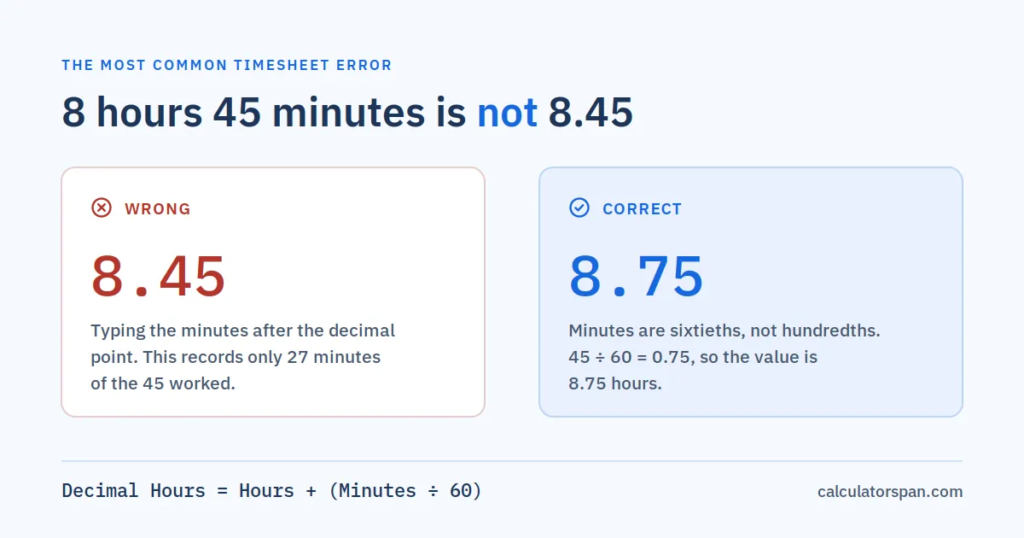
8 hours 45 minutes is 8.75, not 8.45. That mistake pays for only 27 minutes instead of 45, and it’s the most common timesheet error I see.
A quick mental check helps. Any value under 30 minutes should sit below .50, and any value over 30 minutes should sit above it.
Converting Decimal Hours Back to Time
Going the other way, keep the whole number as hours and multiply the decimal part by 60.
Example: 2.7625 hours → 2 hours + (0.7625 × 60) = 2 hours 45.75 minutes = 2 hours, 45 minutes, 45 seconds
For decimal days, minutes, seconds, and full hh:mm:ss results, use our decimal to time calculator.
Minutes to Decimal Conversion Chart
Use this chart to convert any minute value from 1 to 60 into decimal hours.
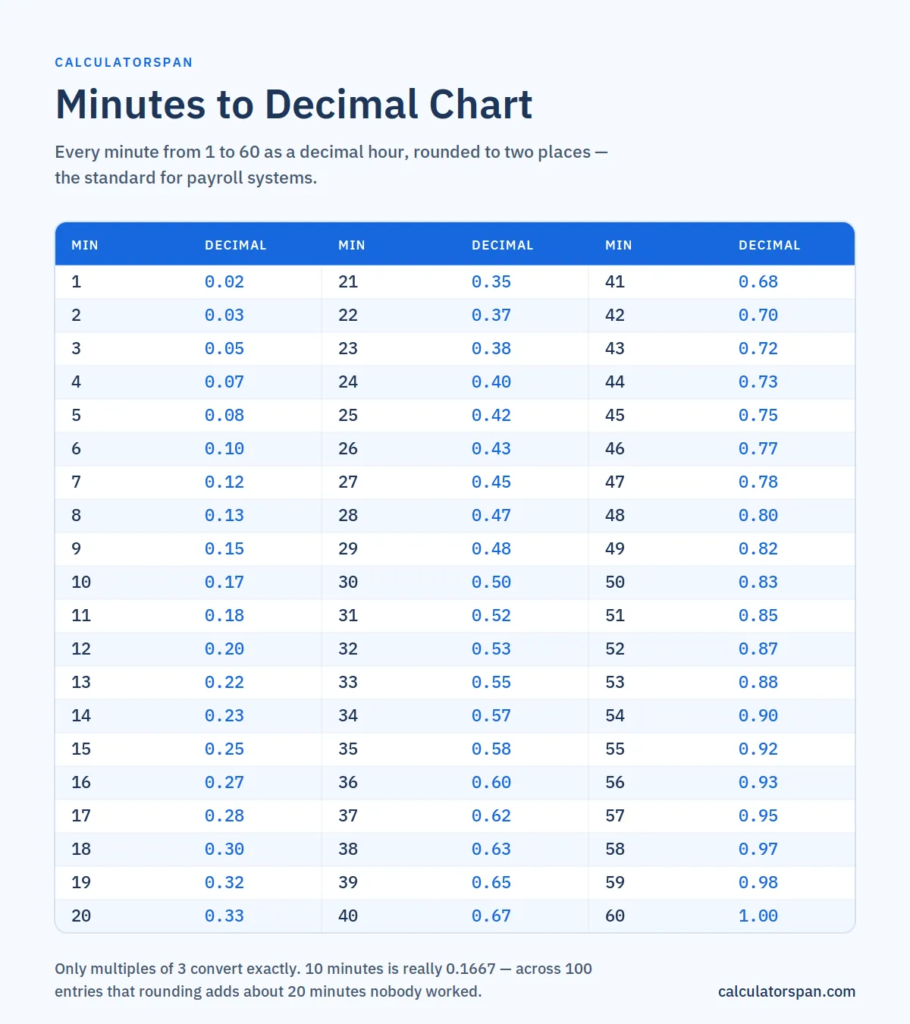
The values are rounded to two decimal places, which is the standard for most payroll systems.
| Minutes | Decimal | Minutes | Decimal | Minutes | Decimal |
| 1 | 0.02 | 21 | 0.35 | 41 | 0.68 |
| 2 | 0.03 | 22 | 0.37 | 42 | 0.70 |
| 3 | 0.05 | 23 | 0.38 | 43 | 0.72 |
| 4 | 0.07 | 24 | 0.40 | 44 | 0.73 |
| 5 | 0.08 | 25 | 0.42 | 45 | 0.75 |
| 6 | 0.10 | 26 | 0.43 | 46 | 0.77 |
| 7 | 0.12 | 27 | 0.45 | 47 | 0.78 |
| 8 | 0.13 | 28 | 0.47 | 48 | 0.80 |
| 9 | 0.15 | 29 | 0.48 | 49 | 0.82 |
| 10 | 0.17 | 30 | 0.50 | 50 | 0.83 |
| 11 | 0.18 | 31 | 0.52 | 51 | 0.85 |
| 12 | 0.20 | 32 | 0.53 | 52 | 0.87 |
| 13 | 0.22 | 33 | 0.55 | 53 | 0.88 |
| 14 | 0.23 | 34 | 0.57 | 54 | 0.90 |
| 15 | 0.25 | 35 | 0.58 | 55 | 0.92 |
| 16 | 0.27 | 36 | 0.60 | 56 | 0.93 |
| 17 | 0.28 | 37 | 0.62 | 57 | 0.95 |
| 18 | 0.30 | 38 | 0.63 | 58 | 0.97 |
| 19 | 0.32 | 39 | 0.65 | 59 | 0.98 |
| 20 | 0.33 | 40 | 0.67 | 60 | 1.00 |
A note on precision: only multiples of 3 minutes convert exactly. For example, 10 minutes is really 0.1667, and the chart shows 0.17. On a single entry, that’s harmless. Across 100 ten-minute entries, though, it adds about 20 minutes nobody worked. For high-volume billing, use the calculator’s 4-decimal result.
Common Minutes to Decimal Conversions
- 15 minutes in decimal is 0.25 hours (a quarter hour)
- 30 minutes in decimal is 0.50 hours (half an hour)
- 45 minutes in decimal is 0.75 hours (three quarters of an hour)
- 20 minutes in decimal is 0.3333 hours (0.33 rounded)
- 10 minutes in decimal is 0.1667 hours (0.17 rounded)
- 40 minutes in decimal is 0.6667 hours (0.67 rounded)
Hours and Minutes to Decimal Chart
Quarter-hour increments convert exactly, which is why most timesheets round to the nearest 15 minutes. Find your shift length below for the decimal value, or use the calculator above for any other combination.
| Time | Decimal | Time | Decimal | Time | Decimal |
|---|---|---|---|---|---|
| 1:00 | 1.00 | 4:45 | 4.75 | 8:30 | 8.50 |
| 1:15 | 1.25 | 5:00 | 5.00 | 8:45 | 8.75 |
| 1:30 | 1.50 | 5:15 | 5.25 | 9:00 | 9.00 |
| 1:45 | 1.75 | 5:30 | 5.50 | 9:15 | 9.25 |
| 2:00 | 2.00 | 5:45 | 5.75 | 9:30 | 9.50 |
| 2:15 | 2.25 | 6:00 | 6.00 | 9:45 | 9.75 |
| 2:30 | 2.50 | 6:15 | 6.25 | 10:00 | 10.00 |
| 2:45 | 2.75 | 6:30 | 6.50 | 10:15 | 10.25 |
| 3:00 | 3.00 | 6:45 | 6.75 | 10:30 | 10.50 |
| 3:15 | 3.25 | 7:00 | 7.00 | 10:45 | 10.75 |
| 3:30 | 3.50 | 7:15 | 7.25 | 11:00 | 11.00 |
| 3:45 | 3.75 | 7:30 | 7.50 | 11:15 | 11.25 |
| 4:00 | 4.00 | 7:45 | 7.75 | 11:30 | 11.50 |
| 4:15 | 4.25 | 8:00 | 8.00 | 11:45 | 11.75 |
| 4:30 | 4.50 | 8:15 | 8.25 | 12:00 | 12.00 |
Other Common Time-to-Decimal Conversions
- 1 hour 35 minutes = 1.5833 hours (1.58 rounded)
- 1 hour 40 minutes = 1.6667 hours (1.67 rounded)
- 2 hours 20 minutes = 2.3333 hours (2.33 rounded)
- 2 hours 40 minutes = 2.6667 hours (2.67 rounded)
- 3 hours 20 minutes = 3.3333 hours (3.33 rounded)
- 3 hours 23 minutes = 3.3833 hours (3.38 rounded)
- 4 hours 20 minutes = 4.3333 hours (4.33 rounded)
- 7 hours 11 minutes = 7.1833 hours (7.18 rounded)
- 9 hours 10 minutes = 9.1667 hours (9.17 rounded)
How to Calculate Total Working Hours in Decimal Format
Start by finding each shift’s length from clock-in to clock-out. Subtract any unpaid breaks, then convert the result to decimal.
Here’s a real week:
| Day | Clock In | Clock Out | Break | Hours Worked | Decimal |
| Monday | 9:00 AM | 5:30 PM | 30 min | 8:00 | 8.00 |
| Tuesday | 8:45 AM | 5:15 PM | 30 min | 8:00 | 8.00 |
| Wednesday | 9:00 AM | 6:15 PM | 45 min | 8:30 | 8.50 |
| Thursday | 9:10 AM | 5:25 PM | 30 min | 7:45 | 7.75 |
| Friday | 9:00 AM | 4:40 PM | 20 min | 7:20 | 7.33 |
| Total | 39:35 | 39.58 |
Convert each day before adding. Adding 8:00 + 7:45 + 7:20 in a calculator as 8.00 + 7.45 + 7.20 gives a wrong total. Our timecard calculator handles clock-in, clock-out, and breaks for a full week in one go.
How to Use a Decimal Hours Calculator for Payroll
Enter the hours and minutes for each entry, and the calculator returns the decimal instantly. Then multiply by the hourly rate. From the week above, 39.58 hours × $18 = $712.44 gross pay.
If total hours pass 40 in a week, the extra hours usually need overtime pay. Our time and a half calculator works out that rate for you.
Using Decimal Hours for Client Billing
Freelancers and consultants who bill by the hour need decimal format for clean invoices. A 2-hour, 45-minute session is 2.75 hours. At $60 an hour, that’s exactly $165.
I recommend showing both formats on invoices, like “2:45 (2.75 hrs).” Clients read the clock time, while your accounting software uses the decimal. That one habit prevents most billing questions before they start.
Benefits of Using Decimal Hours Over Hours and Minutes
Decimal hours give you a single number that multiplies directly by a pay rate. With hh: mm, you always need a conversion step first, and every extra step is a chance for an error.
Totals are also easier to audit. A pay period total of 78.75 hours can go straight into a payroll system or spreadsheet. The same total written as 78:45 needs converting before anyone can do math with it.
Recordkeeping is the third benefit. U.S. employers must keep accurate records of hours worked each workday and workweek under the FLSA recordkeeping rules. Consistent decimal entries make those records easier to total and check.
Frequently Asked Questions
How do I convert hours and minutes to decimal without a calculator?
Divide the minutes by 60 and add the result to your hours. For 1 hour 30 minutes, 30 ÷ 60 = 0.5, so the answer is 1.5 hours.
How do you convert hh:mm:ss like 2:45:45 into decimal hours?
Keep 2 as your hours, convert 45 minutes with 45 ÷ 60 = 0.75, and convert 45 seconds with 45 ÷ 3,600 = 0.0125. Add them together to get 2.7625 hours.
How do you convert hours, minutes, and seconds to a decimal using division?
Divide minutes by 60 and seconds by 3,600, then add both to your hours. For 3 hours 20 minutes, 20 ÷ 60 = 0.3333, so the result is 3.3333 hours, or 3.33 rounded.
What is the fastest way to convert 8 hours 15 minutes into decimal hours?
Divide 15 by 60 to get 0.25, then add it to 8. The answer is 8.25 hours.
How do you convert 2:45:45 into a decimal using total seconds?
Multiply 2 × 3,600 for 7,200 seconds and 45 × 60 for 2,700 seconds. Add 7,200 + 2,700 + 45 for 9,945 seconds total. Divide by 3,600 to get 2.7625 hours.
How do you convert 2:45:45 into a decimal using total minutes?
Multiply 2 × 60 for 120 minutes, keep the 45 minutes, and convert 45 seconds with 45 ÷ 60 = 0.75 minutes. Add them for 165.75 minutes, then divide by 60 to get 2.7625 hours.
Why is 8 hours 45 minutes not 8.45 in decimal?
Decimals count in hundredths, while minutes count in sixtieths. 45 minutes is 45 ÷ 60 = 0.75, so the correct value is 8.75. Entering 8.45 would record only 27 minutes.
What are the best ways to convert minutes to decimals for timesheets?
For one or two entries, divide the minutes by 60 by hand. For quick lookups, use the conversion chart on this page. For a full week of entries, run everything through the calculator above to avoid rounding drift.
How does a decimal hours calculator help with accurate payroll?
It removes the manual conversion step, which is where most errors happen. Enter your hours and minutes, multiply the decimal result by the hourly rate, and the gross pay figure is ready for any payroll system.
- Time calculator: add or subtract hours across multiple shifts
- Decimal to time calculator: convert decimal hours back to hh:mm:ss
- Timecard calculator: total a full week of clock-in and clock-out times
- Time and a half calculator: work out overtime pay
- Hours ago calculator: find the exact clock time a shift started
- Hours from now calculator: find when a future shift ends